Revit Parameters
Setting up and managing Revit Parameters to support quantity takeoff and cost estimation.
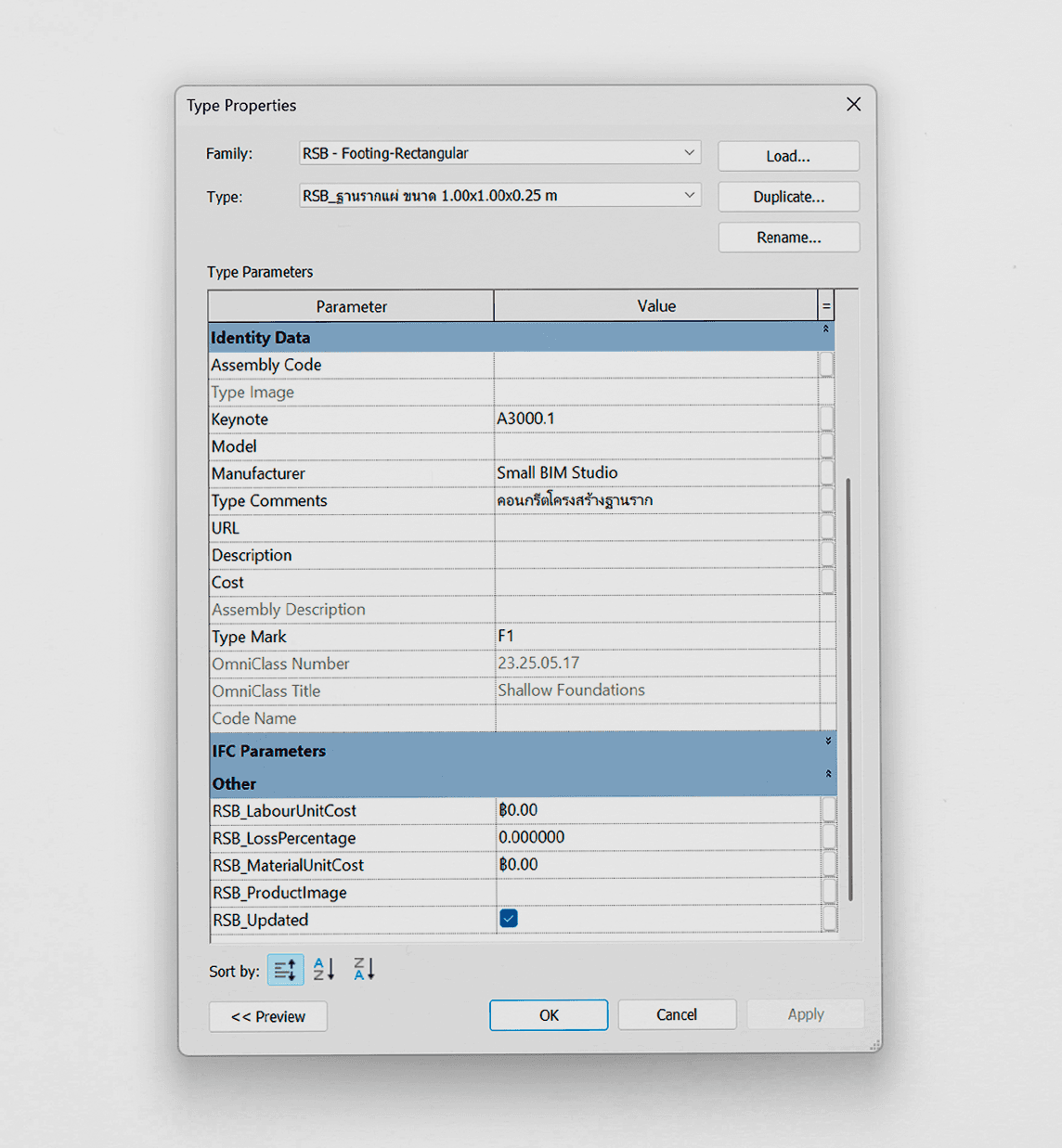
Recommended Practices
- Use existing Revit parameters to assign cost codes (Keynote), material names (Type Comment), and model numbering (Type Mark, if applicable)
- For cost estimation, only a few parameters are needed — not all of them. The initial data setup is straightforward, requiring only Keynote and Type Comment.
- The RSB_PROFESSIONAL Template includes default values for frequently used Families across all categories, ready for price referencing
- For new Family types outside the template, assign a Keynote matching the desired work category so the Add-in can look up pricing
Example Data Assignment (see image on the left)
Keynote (Cost Code):
(Reference code for retrieving prices from the database)
Keynote = A3000.1
Type Comment (Material Name):
(The material name assigned here will appear on the BOQ)
Type Comment = คอนกรีตโครงสร้างฐานราก
Type Mark (Model Number):
(If assigned, the name will appear alongside Type Comment, e.g. F1 - Foundation Structural Concrete)
Type Mark = F1